MAO-Clip Functions
The device's functions are controlled by different button press durations:
- Short: Longer than 50 ms and shorter than 600 ms
- Long: Longer than 600 ms
- Very long: Longer than 5 seconds
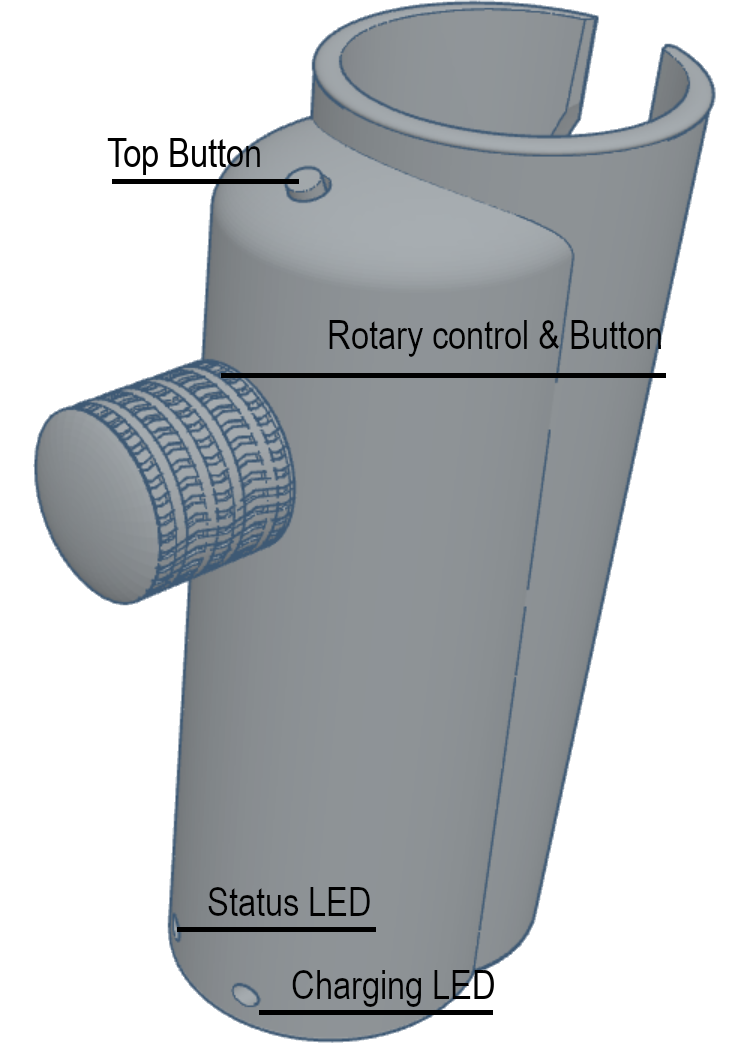 |
Top button
- Short press: Stop (media_key_stop)
- Long press: Play from beginning (key_media_period or "." key)
- Extralong press: Adjust the number of volume steps (2 → 3 → 1)
To confirm, the yellow LED flashes according to the selected level:
1 flash = 1 step
2 flashes = 2 steps
3 flashes = 3 steps
This function is particularly helpful on tablets and smartphones, as the standard volume steps are often too small to quickly achieve a noticeable change.
Alternatively, on laptops, the volume control can be customized using AutoHotkey (implemented from version 09.02.2026).
Rotary control
- Rotary function
Turning the control sends a volume command depending on the direction:
Decrease volume (key_media_volume_down)
Increase volume (key_media_volume_up)
- Button function (push button)
The rotary control also functions as a push button:
- Short: Play/Pause (key_media_play_pause)
- Long: Next track (key_media_next_track)
- Very long: Reverse rotation direction
After successfully reversing the rotation direction, the yellow LED flashes twice to confirm (implemented from version dated 09/02/2026).
Status LED
- Flashing yellow: Device is ready for pairing.
- Solid yellow: The MAO is connected to a device.
- Off (after a set time) even though the MAO is switched on: Deep sleep mode is active. This is designed to conserve battery power if, for example, the MAO has not been used for a long time. To exit deep sleep mode, switch the MAO off and then on again. The LED will flash again or turn solid yellow. (from version 1.0.5 dated 09/06/2026)
If the MAO is to be connected to another device, the existing connection must first be disconnected.
Charging LED
- Flashing red: The internal battery is charging.
- Solid red: The battery is fully charged, or the on/off switch next to the USB port is turned off preventing charging.
- LED off (with charging cable connected and device turned on): The battery is fully charged.
|
Note:
Please do not pay any attention to the battery indicator information within the Bluetooth connection (e. g. 100 %) For reasons of energy saving and runtime maximization, we have not implemented any active battery charge level information.
The battery will only charge if the MAO is switched on at the same time. For safety reasons, switch it on first, then connect it to the charger. => The red LED flashes.
Autohotkey Configuration
#Requires AutoHotkey v2.0.+
; AutoHotkey script for controlling SquareView or other players using the MicroAddOn
; the following keystrokes are sent by the MicroAddOn via a Bluetooth keyboard interface.
Volume_up:: SoundSetVolume "+10"
Volume_down:: SoundSetVolume "-10"
Media_play_pause:: Send "{Space}"
Media_Next:: Send "k"
; sqview doesn't have a hotkey for Stop, so . and space
Media_Stop:: Send ".{Space}"
; the key "." will be used directly